 AccuraBooks
 Accounts Receivables Statements in QuickBooks Desktop
This article deals with processing those unique customer statements from the QuickBooks Desktop platform.
Customer “statements” are not necessarily the same as the typical Accounts Receivables reports.
Accounts Receivables reports will have all the open invoiced amounts, per customer, onto one report. However, customer statements, will focus displaying all that pertinent AR activity onto one statement, JUST FOR A SPECIFIC CUSTOMER.
There are basically two types of customer statements that are available in the QuickBooks Desktop platform:
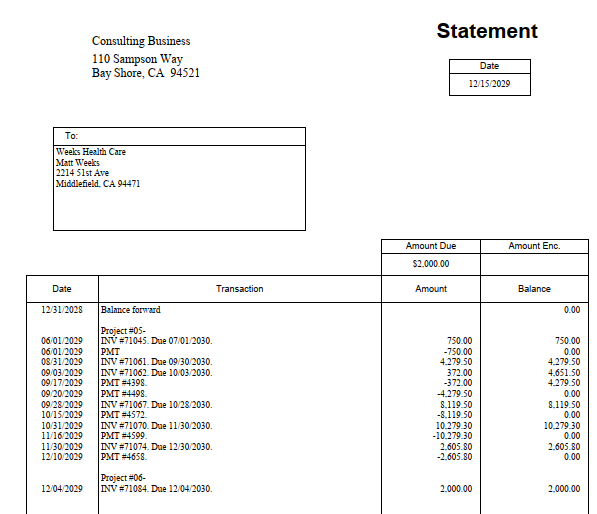
- A customer receivables history report that will show ALL posted invoicing, payments, and credit activities onto one statement, in chronological order, with what the ongoing open balance was after each event (invoice, payment or credit) was posted on that date, for a selected customer’s account.
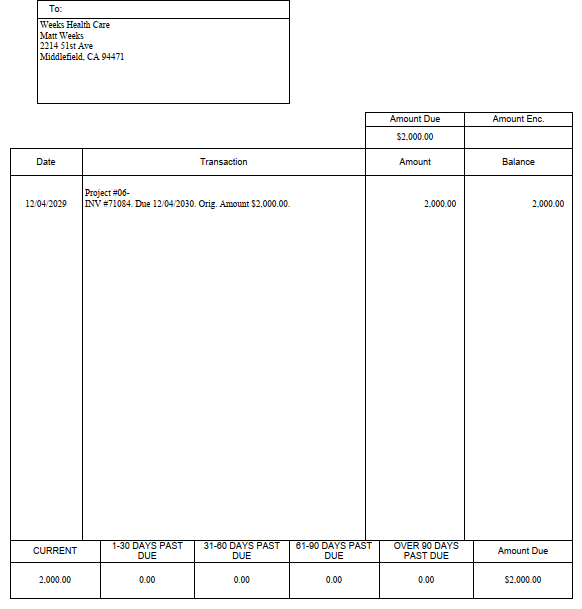
- All open transactions as of a selected statement date. This statement will only display all unsettled transactions, for one customer, as of a particular date. An unsettled transaction here is any Receivables event (invoice, payment, credit) that has not been applied to any other Receivables event yet.
Both statements above have their usages, and can be powerful if you need to reconcile your Accounts Receivables with one of your customers, especially if THEY claim that their balance (that they owe you) is different than what YOU claim they still owe to you.
So, to process a customer statement in QuickBooks Desktop, you can do this following:
- Go to the Customers drop-down menu and click on “Create Statements.”
- Select your Statement Date in the upper left corner.
- Now, most importantly, you will either select “Statement Period from,” or, “All open transactions as of Statement Date.”
Here is an example of a “Statement Period From” statement:
Below is an example of “All Open transactions as of Statement Date”:
Note: AccuraBooks is a bookkeeping firm only, so please consult with your C.P.A. for verification and clarification about the contents of this article.